
Tap tempo BPM finder
Tap along to any beat and read the tempo as you go. Free, in your browser, nothing to install. For more free features, see what the app does and get it on Google Play. iOS coming soon.
Tap a rhythm to see the vibe.
Click, tap or press the space bar. Four taps is usually enough.
That is your tempo. BPMcountR keeps it on your phone, with a metronome to play it back and the microphone to find the next one without tapping.

BPMcountR for Android
BPMcountR is a free tap tempo BPM counter and metronome app for Android. Find tempos without tapping, practice at them, and keep them ready for the gig. Built for musicians, drummers, DJs, producers and music teachers.
No ads, no account, no subscription, and it works with the phone in flight mode. Rehearsal rooms rarely have reception.
BPMcountR — Tap BPM & Metronome
Free to use, and not a demo. Pro costs €7.99 once. No subscription, and it stays unlocked.
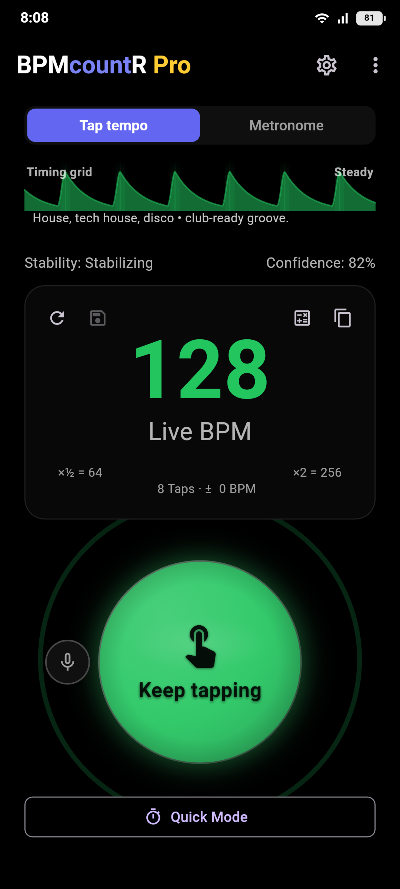
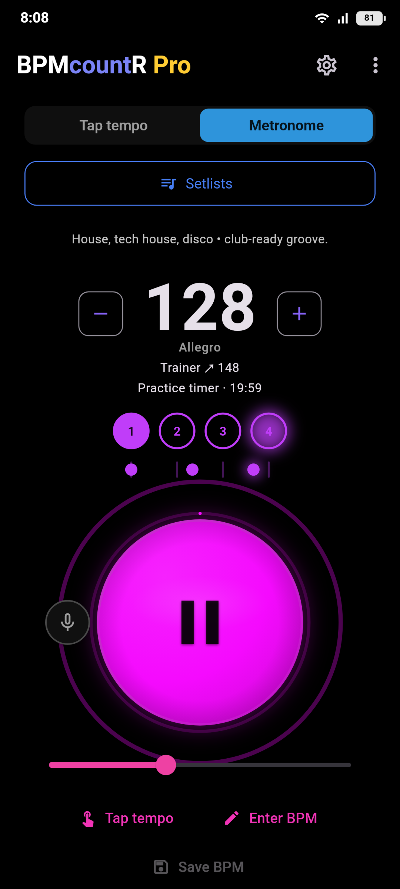
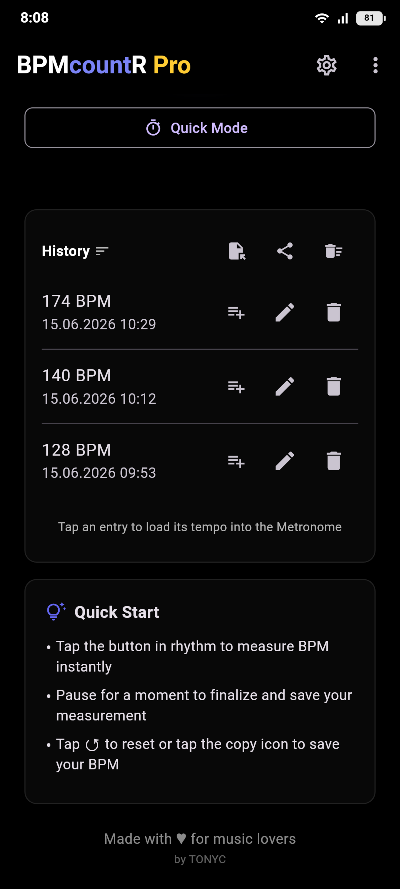
Screens from the app with Pro unlocked. Everything in the first two is in the free version as well; free, the history keeps three entries instead of all of them.
- Metronome with time signatures and accentsPut the accent where the exercise needs it, in any time signature. It keeps playing with the screen off, and needs no reception in a rehearsal room. 6/8, 9/8 and 12/8 are counted and accented in threes, free. Subdivisions (eighths, triplets, sixteenths, swing feel) and the count-in are Pro.
- Missed and double taps correctedA slipped tap is thrown out, a beat counted at half or double speed is put right, and a stability indicator tells you the moment the tempo locks in.
- Listen Mode: beat detection through the microphoneProHold up your phone and BPMcountR picks the tempo out of the room. No tapping at all.
- Practice timerProSets and rest: 5 × 2 minutes with a break between reps, and the metronome runs the whole session for you.
- Tempo trainer and gap trainerProRamp the tempo up bar by bar, or drop bars into silence to find out whether your inner clock holds.
- Timing gridEvery tap plotted against the beat, so you can see whether you rush or drag. Free for the first eight taps of every measurement, which is where the pattern first becomes readable.
- Practice statisticsProYour timing over the weeks, your personal best and your practice streak, plus a log where every measurement and every metronome run keeps a line of its own, with its BPM, tap count, meter and length. Free shows a sample of the figures and the last three sessions.
- Setlists and historyName, comment and export your measurements as CSV. Setlists hold tempo, time signature, subdivision and accents for each song in the set, and a set goes out as a file the rest of the band can import. One setlist and three measurements free, unlimited with Pro.
- Backup and restoreProSettings, history and setlists in one file, out through the share sheet and back on the next phone. No account, no server, nothing recurring.
- Note length calculatorProEvery note value for a tempo in milliseconds: the numbers you need for a delay or a gate. There is a free calculator on this site too.
- Made for the tablet tooOn a wide screen the readout and the controls sit side by side instead of stacking, so the tempo stays readable with the tablet on a music stand.
What you get for free
The free version is the whole tap counter, and a metronome you can gig with: any time signature, accents where you want them, and it keeps playing with the screen off. Pro lifts the limits and adds the subdivisions, the trainers, the practice timer, the practice statistics and the note-length calculator. Nothing Pro is bought unheard: tap a locked groove, subdivision, cross-rhythm or count-in and one bar of it plays, a locked camera or screen flash pulses once before the upgrade screen appears, and either trainer runs a free Pro trial of two tempo steps or two gaps before it stops, as often as you like.
| Feature | Free | Pro |
|---|---|---|
| Tap tempo counter | Yes | Yes |
| Metronome, time signatures and accents | Yes | Yes |
| Compound meters counted in threes (6/8, 9/8, 12/8) | Yes | Yes |
| Drum grooves instead of a click | — | Ten patterns |
| Polyrhythms across the bar | — | Yes |
| Subdivisions and count-in | — | Yes |
| Background playback | Yes | Plus tempo from the lock screen |
| Home screen widget: last tempo, one tap to start | Yes | Plus tempo − and + |
| Daily practice reminder | Yes | Yes |
| Timing grid | First 8 taps | Whole session |
| Half and double reading shown at once | — | Yes |
| Saved measurements | Last 3 | Unlimited |
| Practice stats, calendar and session log | Sample figures, this month, last 3 | Full history, every month |
| Setlists | One | Unlimited |
| Sharing a setlist as a file | — | Yes |
| Listen Mode: beat detection through the microphone | 60 s once, then 15 s free every week | No limit |
| Practice timer | — | Yes |
| Tempo trainer and gap trainer | Pro trial: 2 steps or 2 gaps per run, repeatable at once | No limit |
| Note length calculator | — | Yes |
| History editing, import and CSV export | — | Yes |
| Backup and restore | — | Yes |
| Quick Mode, tap anywhere, BPM decimals | — | Yes |
| Genre and vibe captions | — | Yes |
| Metronome and tap sounds | One | Twelve |
| Screen and camera flash | — | Yes |
| Color styles, rainbow and mono | — | Wave, spread, direction, hold |
| Ads | None | None |
Pro costs €7.99, once, and it is not a subscription. Buy it and it stays unlocked on every device signed in to the same Google account.
BPM by genre lists the typical range for about forty styles. House sits at 128, drum and bass at 174, hip-hop at 90, and dubstep counts as both 140 and 70, and that page explains why.
This site also explains what an online metronome can and cannot do, and has a delay time calculator that turns any tempo into milliseconds.
Questions
How does tap tempo work?
You tap in time with the music, and the counter measures the gaps between your taps. Beats per minute is what those gaps work out to: half-second gaps mean 120 BPM. Four taps give you a usable number, and it steadies from there.
How many taps do I need?
Two taps already show a number, but it wanders. From about four the reading holds still, and by eight it only moves if you change tempo on purpose. Stop for three seconds and the next tap starts a fresh count.
How do I find the BPM of a song?
Play the track and tap along on the beat you would count out loud. If the number lands at half or double what you expected, you tapped a different pulse than the one you had in mind. Both readings are correct, they just count the song differently.
The number keeps jumping. What now?
Tap on the beat you feel most clearly, usually the snare or the kick, and give it a few more taps before you trust it. The app goes further: it throws out taps that slipped, corrects a beat you accidentally counted at half or double speed, and tells you when the tempo has locked in.
Is there a metronome?
Not on this page, which only measures. The app has one, with time signatures, accent patterns, subdivisions, a count-in and background playback. What a browser metronome can and cannot do is a longer answer, and it has its own page.
How do I turn a tempo into a delay time?
A quarter note at 120 BPM lasts 500 ms, and every other value follows from that: eighths half of it, dotted eighths one and a half times, triplets two thirds. The app's note length calculator lists them all at once for whatever tempo is on the display, ready for when you are dialing in a delay or a gate.
What does BPMcountR cost?
The app is free and useful without paying: the tap counter, the metronome with its time signatures and accents, one setlist and your last three measurements. Pro is a one-time €7.99 and unlocks Listen Mode without a time limit, the metronome's drum grooves, polyrhythms, subdivisions and count-in, the practice timer, the tempo and gap trainers past their short Pro trial, the full timing grid, the practice statistics and their session log, the note length calculator, backup and restore, and unlimited history and setlists. One payment, no subscription, no ads either way, and it stays unlocked.